Leaderboard



Popular Content
Showing content with the highest reputation since 09/28/2026 in all areas
-
Hi everybody, It's looks pretty slow on Forum. Here's the project someone may find handy. The Link included. Alex558 points
-
This transition is emulation of Google Photos Slideshow transition. I have recently started using PTE again and amazed at the transitions recently posted. Tom Quick Slide.pteeff7 points
-
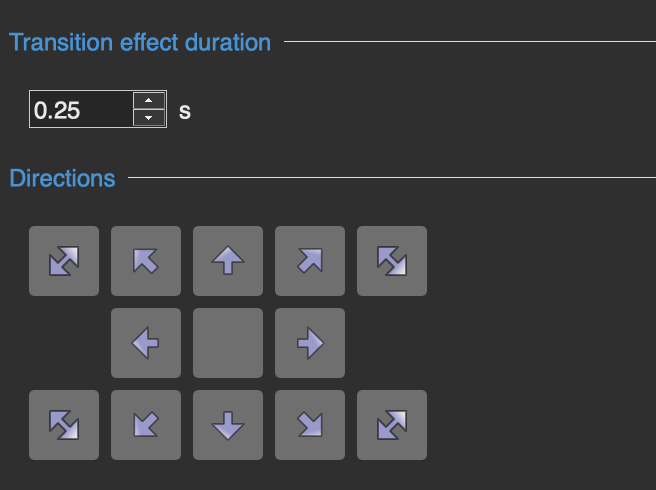
My latest version. Modify and improve if you want to. I was interested in designing a button layout for the two additional effects. Thanks, Tom Update: I noticed after posting 2 of my arrow icons are different than the others. Here is what they look like now. You can easily edit them iso I will not post a new version of the transition (see image below). Quick Slide V3.pteeff
 6 points
 -
Hi! In case you like geometric shape transitions, here is a link if you want to try them out. https://www.mediafire.com/file/owcke2r14qhaw8z/Geometric_shape_transitions.rar/file4 points
-
Hi, We've added experimental support for images in PSD format. It works only for PSD files saved with the "Maximize Compatibility" option (enabled by default in Photoshop), which includes the merged layer. Try the new v12.0.5 Beta: https://www.pteavstudio.com/forums/topic/56408-pte-1205-beta/ Please check this Beta with your PSD files and let me know if they are all supported in PTE AV Studio now. Would it be disappointing if some PSD files failed to display (PSD images saved without the "Maximize Compatibility" option)? Should we keep this experimental feature in the final code of V12? We still recommend to use JPEG format as the best choice - it offers an optimal file size, very good quality, and fast loading, especially for high-resolution images.4 points
-
https://mapanimator.baldinger.se/ It works with GPX data files and photos along the map.3 points
-
Hi! A bit of confetti is always a nice touch. Here is a style available in two formats, for 16:9 and 9:16 projects. https://www.mediafire.com/file/la51jrl1avh3knp/Style_Confetti_Explosion.rar/file3 points
-
Hello everyone, I leave you the link to these transitions in case someone wants to try them. Edited: I have created some new transitions that are slightly lighter in file size by using blend masks and eliminating the alpha video. I will leave the link to the previous ones so they can be used in version 11, while these new ones are for version 12 only. PTE AV Studio v.11 y v.12 https://www.mediafire.com/file/l4jq6xlu6ze3stv/Light_Leaks_Transitions_2.rar/file PTE AV Studio v.12 https://www.mediafire.com/file/tv281dluq0b7yb5/Light_Leaks_Transitions_2_%28PTE_12%29.rar/file3 points
-
Hello, I’m sharing these script-style fonts with you. https://www.mediafire.com/file/ulcm7t4fw0b6aq8/Script_Lettering_Style.rar/file2 points
-
Hi Everyone! I've been a slideshow enthusiast for over 23 years now, starting with MemoriesOnTv, moving to ProShow and now using PTE AV. I've created over 100 slideshows, mainly of my holidays (with the kids), making them into short movies (30-60 minutes). One thing I've missed in almost all tools, is a way to bulk edit the slideshow. Such as: Change slide duration only for photo slides Apply complex slide timing rules (subtract, add, %, video length) Sort slides based on file name, date, extension, size and type Randomize transitions by selection Apply KenBurns (or other) effect only to photos Apply volume settings to all videos at once Have a version control with descriptions and backup Enable presets for your favorite settings Choose the exact pan/zoom/rotate settings in bulk So I've created my own solution that I used to automate my slideshows according to my preferences. I've used it only for myself, but wanted to share this with the community after trying to code it online. For now I'm looking for 5 beta testers that can use the product for free for a couple of weeks and give their feedback. After that, I'm considering making the tool paid, but also maintaining it and implementing requests. Preview (version 1.0): https://unomne.com/pteav If you want to sign up, respond with "beta" below. NOTE: you need to upload only your .pte file, NOT your media files. So the system will have access to file names, durations etc, but not see the photos or videos.2 points
-
Updated version of PTE AV Studio 12.0.5 is available for PC and Mac Download: https://www.wnsoft.com/pte-av-studio/download/ Or use the Auto Update function: Main menu > Help > Check for Free Updates Added support for images in PSD format. Only for PSD files saved with the "Maximize Compatibility" option (enabled by default), which includes the merged layer. Added support for videos in the MXF file container. Fixed an issue where TIFF images used as decorations were not displayed correctly in slide styles. Fixed an issue on macOS where Arabic letters in text objects overlapped each other. About window shows: 12.0.5 Build 2 (Build 1 on Mac)2 points
-
If you need to move all of the sound clips together on a Track then Hold Shift & drag them left or right. If say the first few are ok & you just need to move later ones, then just click on the Clip you wish to start from & again hold Shift & Drag. An Alternative is to double click on a clip, which will open up Project Options/Audio & you can then adjust the timings in there. To make sure in future that clips don't move away from a Slide then Link the Sound Clip to a Slide. Click the Slide, then Right Click the Clip & Select Link Audio to Slide # You can also Lock a Track so that it can't be moved. You can't select all tracks at once. Jill2 points
-
Hi, If you like the new PTE AV Studio 12, please share the news about V12 on your page or with your photo club. Thank you! Here is a short example text. Feel free to edit it as you like:2 points
-
Hello, I’m sharing these 15 styles with you; I hope you like them. They are for creating slides with text, images, or both, with the option to change the background. https://www.mediafire.com/file/h5pvsstzbo9mxv4/4K_Floral_Styles.rar/file2 points
-
Hi, Try the new version 12.0.5 Build 1: https://files.wnsoft.com/test/pteavstudio-setup.exe Now it works correctly with TIFF images in slide styles.2 points
-
Hi, Thanks. I’ve added the missing Spanish version of this page, so the link should now open correctly.1 point
-
I uploaded a poem to chatGPT and asked it to create a slideshow. Each line in the poem stanza added one second to the slide duration. It was interesting. I still prefer manual creation over the AI version. Tom1 point
-
Very little has changed in this area since I did the original Style. I still think that the best way forward is the way that I did it i.e. Photoshop. DG1 point
-
Hi, Thanks for your message. We've added this idea to our TODO list.1 point
-
Hi, Welcome to the forum, and thanks for sharing your tool. It has some good ideas. Good luck!1 point
-
Thank you Jill for the information1 point
-
Interesting. Still in alpha release. Written using AI and Rust programming language. https://getartcraft.com/apps Review of Lighroom clone from my favorite photo editor reviewer.1 point
-
Hi Igor, Thanks for the improved version. I'm always learning new methods of using PTE even after all these years. It never gets old (except me). I am looking forward to using PTE more this winter when super El Niño arrives in the Pacific Northwest.1 point
-
Hi Tom, Thanks for sharing your transition! I’d like to suggest a small improvement. You can animate different parameters, movement and opacity - independently. - Animate movement (Pan) from the 1st to the 3rd keyframe, with a speed modifier (Slow down) on the 1st keyframe. - Change the opacity from the 1st to the 2nd keyframe; the 2nd keyframe affects only the opacity, while other animation groups (Pan, Zoom, Rotate, etc.) are disabled (unticked). The ability to selectively disable (untick) animation group(s) allows for the insertion of intermediate keyframes where other animations remain unaffected while other properties, such as opacity - can be modified. Here is an example: Quick Slide V2.pteeff1 point
-
This feature has been available for some time, at least V10 I think. When you get the box listing the missing images, click on Find File & then when the Explorer window opens you need to navigate to the Folder that contains the images. It will automatically open the Folder that contains the .pte File, so you need to go to the Folder that contains the images/sounds. Once it finds one, if they are all in the same Folder then the others will be automatically found also. It is best to get into the habit of Creating a Template of a Show or a Backup Zip so you know that everything is in one place for that show. Jill1 point
-
Hi, here are some transitions for you; I hope you can use them if you like them. https://www.mediafire.com/file/gw0ot8t04q2z5o3/4K_numeric_transitions.rar/file1 point
-
I have checked out the PSD support & yes it does show PSD files in the FileList & they can be added to the SlideList. But they do take a long time to display the thumbnail in Filelist as they are so large. As I now do all of my editing in PTE I no longer use Photoshop or other programs that create PSD Files. All of my PSD files are very old, but they do work. However I cannot see any advantage in using them, they are very large files & it only shows the visible image rather than individual layers. Creating a jpg from the PSD is very easy & produces a much smaller file size which is much quicker to load & use within PTE. I will stick with jpgs & doing my editing within PTE. Jill1 point
-
Aleina, thanks for your response! Glad that PSD support works correctly. --- P.S. This Beta is a stable version, so we can publish it as a final version.1 point
-
I am very grateful for the PSD support—it is really important to me, as I often have to mock up items like newspapers in the program. It solves so many problems at once! I’ve tested this feature, and it works!1 point
-
Malcolm, The discount expired a long time ago, it was only if you bought it pre final release. PTE already produces optimised file sizes, so running a MP4 created in PTE through Optimiser won't really reduce the file size. At least I don't think it would. But if your MP4 has been created by another program, then it may reduce the size. But I think PTE would also. This is my understanding, if Igor can say otherwise then I stand corrected. Jill1 point
-
Hi, This feature (timeline scaling) is already on our TODO list, and I agree that it would be very useful. Let me say a few thoughts. We have many ideas for improving the product (PTE), so we constantly have to choose what to build now and what to implement later. Some ideas or features might look simple but are actually very difficult to implement, because they are deeply integrated into complex old code. Sometimes we wait to rewrite a whole large section of code so we can add several new features at the same time. We have a small team. For example, one person writes the code for slide styles, another work on the Objects and animation editor, and a third works on effects and custom transitions. There is also important ongoing work - refactoring (restructuring) old code - that is not immediately visible to users but is very impotant to ensure the legacy code doesn't break down under the weight of new features and effects. Then there is the matter of cross-platform support (PC and Mac). Sometimes we spend a long time working on a new feature or effect and hit a "dead end" - it doesn't work as intended, so we have to delay it, and time is lost. Yes, we might also make mistakes when prioritizing which features to include in a new version. We're trying to make the program better with every release, but we aren't perfect, and we ask you excuse us, if we don't always meet your expectations! In any case, I always welcome all constructive criticism and reminders about the features you’d like to see. Thank you!1 point
-
Hi, here are some transitions I've created with the help of a friend who gave me a hand with a few minor issues. Since these are my first ones, I'd like to share them with you. https://www.mediafire.com/file/0kqiuqzxbo61z9f/Papel_Unido_v.2.rar/file1 point
-
A little late, but... I have a small gift for you in connection with the release of version 12 of the program. A set of transitions for your creativity. I hope you find them useful. Thank you. ZigZag Fold Transitions PTE AV 12 includes three transition options: A standard package of four transitions, A 9x16 version for vertical videos, A version with sound effects. Download link below the video on YouTube1 point
-
10 Mesh-style transitions for your creativity. The download link is in the description on YouTube. https://youtu.be/hCCnVIFCGs81 point
-
Hi everybody, The idea of the Slideshow was the illustration one of the new PTE V.12 feature-Blending Modes. This is basically variations of the one Style--Screen Blending Mode. The set of pictures placed in the Stencil Container and the Background Composition-in the Mask Content. There's some whistles and bells here and there also to make it looks more cinematic. To my mind, of course. If you like it--there's The Link. Just replace the files marked "Replace Me" with yours Media. Best Alex551 point
-
Taking advantage of the new transition editor in Pte AV Studio 12, which saved a lot of time when creating them, I made 20 transitions, each approximately 10 seconds long. In this case, the slide has a duration of 9.90 seconds, the same as the transition. I'm including a link in case anyone wants to try them. https://javier-pteavstudio.blogspot.com/2026/06/particles-transitions.html1 point
-
Hi everybody, Love this song. Tried to find suitable Styles to fit. Here's the result. Note, this is 16x9 Aspect ratio, so choose pictures accordingly or crop the aspect to 16x9. Best Alex551 point