Igor
-
Posts
13,678 -
Joined
-
Last visited
-
Days Won
290
Everything posted by Igor
-
Hi Roger, If I understood rightly, you observe this problem only in a full screen Preview and in the Mini Player (in the main window). Right? Try to restart Windows to check if it helps to solve this issue. 1. Please can you describe in more details - what exactly you see? Is it skipping frames during video clip playback (choppy playback)? Or some flickering on the monitor? 2. Do you add video clips at HD 1080p quality, or 4K UltraHD? 3. Try to open the Sample Project, included with PTE AV Studio. Browse the Main menu > Help > Open Sample Project. 3rd slide contains a video clip with a slow motion (a pelican bird). Do you see the same issue on this slide in this project? 4. Tell me about a configuration of your PC (graphics card). If this problem persists, I recommend to manually update drivers for your graphics card (NVIDIA, AMD or Intel). P.S. Jill, thanks for your advices!
-
Hi, Are you using a monitor with a sRGB standard color space or an advanced monitor with a wide color space (Adobe RGB or P3)? If have a standard monitor, try to add some test JPEG image with sRGB color space sRGB to your project and compare colors (with Photoshop). You need to determine where exactly this issue occurs - with certain images or with all images.
-
 Hi, I apologise for this problem. Probably you use an old release of V11 ? Please check the About window in PTE AV Studio. I highly recommend to install the latest version 11.0.18. Just download it from WnSoft website and install. All your settings and projects will be saved. I remember there was a similar issue which was solved more than one year ago.
 -
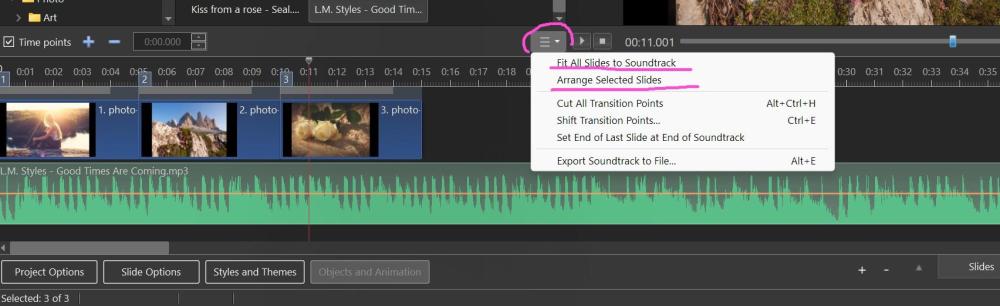
Hi, You can find more commands to adjust slide durations in a special button menu (in the Timeline mode).
-
Hi, I understand your feelings. Probably you had a hard day. I belive that there was a misunderstanding. For PicturesToExe 9.0, we did not promise free upgrades to the next major releases (10.0 and further), even if the program was called PicturesToExe). You can check out PicturesToExe 9.0 order page on the Internet Archive (May of 2017, two months after the release of V9): https://web.archive.org/web/20170503164507/http://www.wnsoft.com:80/en/picturestoexe/buy Quote: "One year of free updates provided (performance improvements and bug fixes)." We provided free updates (bug-fixes and small improvements) more than 2 years - until May of 2019. The same upgrade policy was for V8 (released in December of 2013). For V9 users we still offer the upgrade to the latest V11 for $49 (from Deluxe to the Pro) or $36 (from Essentials to the Standard). Instead of the full price ($149 or $75). I believe that it's not large fee to get a new major version with many improvements new exciting features! Anyway, you can continue to use the purchased version unlimited time. Some our nearest competitors switched to subscription based pricing model and you have to pay annually 99-250 euro! It's much more than you paid for PicturesToExe. And our other closest competitor (Proshow) went bankrupt in 2020 - they did not dare to introduce a subscription! We need your support, while users purchase upgrades we can continue to develop new versions of PTE AV Studio (PicturesToExe) and introduce new functions and effects. With hope on your understanding, Igor,
-
Updated version of PTE AV Studio 11.0.18 is available for PC and Mac Download: https://www.wnsoft.com/pte-av-studio/download/ Improved smoothness of video playback (in HEVC format) in EXE shows and Safe EXE shows on slow PCs. Reduced CPU loading. Especially for video clips in 4K resolution. Windows only. Significantly reduced memory usage when creating MP4 video with Motion Blur option. Mac only. Improved smoothness of Flip 3D transition for slide with a video clip. About window shows: 11.0.18 Build 3. It's the same build as previous Beta version.
-
Hi, Please translate your posts to English. You can use Google Translate, DeepL or ChatGPT. Per favore, traduci il tuo post in inglese. Puoi usare Google Translate, DeepL o ChatGPT.
-
Hi Barry, Thanks for sharing! Fantastic landscapes. Some pictures remind me the UK, I remember that you live in Australia.
-
Jan, In future PTE 12 we added new 2 modes: Chromatic displacement and Dynamic gradient map. It will give you more creative possibilities.
-
Robert, glad that you solved that issue. Good luck!
-
Robert, OK, I'll wait for a result.
-
Hi Robert, 1. Does this issue related with a certain MP3 audio file? 2. Where exactly this beep sound occurs: at beginning, in the middle, or at the end audio file? 3. Compare a full screen preview and created MP4 video file 4. Please check again the original MP3 audio file in some audio player to make sure that it does not contain any audio defects at the same time point. 5. Check the Timeline view in PTE AV Studio. Audio waveform may reveal defects in audio files - you can see a high peak in a waveform. Try to create a simple test project to reproduce this problem. You can upload a ZIP archive with your simple project using Google Drive, WeTransfer.com . Use a special command - Create backup in a ZIP from the main menu of PTE AV Studio.
-
Hi, Thanks for your interest to PTE AV Studio! Create a single EXE show file (not fullscreen preview). Just tested - works. However, keep in mind, that this is a simple protection.
-
Hi Tom, I agree with you, we'll try to improve these mouse pointers in future V12.
-
Hi Tony, Yes, the stabilisation mode automatically decides how much zoom is needed to effectively stabilise a video frame (even if you set the Expand to "0"). However sometimes (rarely) small black bars may appear on the edges in case of strong shaking in a frame. In this case, the Expand option will help to correct a frame. Also if even the "Strong" stabilisation mode doesn't help to stabilise a video frame (or if you want a perfect stabilisation!), the Expand option gives the stabilisation algorithm more screen space for more effective stabilisation. Try values between 5-10 for the Expand option. Consider another mode - Camera Lock, if the movement in the frame is small (shooting handheld, but the operator tries not to move a camera, not to turn a camera). In this case, stabilisation will be ideal, as if you were shooting from a fixed tripod. I've checked many video files from different sources, from different cameras. Normal or Strong modes do a good job for 95% of shaky video files without using the Expand option. In the following promo video, I've used Strong mode for a stabilisation of the 1st video (Expand = "0", by default) and Camera Lock mode for the second video: https://www.youtube.com/watch?v=oWu-IlXTDvE P.S. Jill, thanks for your comment!
-
Publishing problem due to limited RAM on MacBook Pro
Igor replied to MichaelV's topic in Troubleshooting
Hi Mike, We have reduced memory usage when using the Motion Blur option: https://www.pteavstudio.com/forums/topic/48636-pte-11018-beta/#findComment-189151 v11.0.18 Build 2. -
Thanks! We'll include transition in future V12.
-
Hi, One new user asked me recreate a special style/transition effect. I share it with you. Slide style + demo: Demo - Zoom Out with Fade.mp4 Zoom Out with Fade.ptestyle
-
Dave, You rightly suggested Rosemary to copy and replace "Styles and Transitions" folder. Copy this folder from an old PC to a new PC. PTE AV Studio should be closed when you replace this folder. In future version 12 we'll add import & export commands to help with this task. PTE AV Studio will create a single ZIP archive. It also can be used to backup all styles and transitions and recover a broken storage to previous state by importing a previous copy.
-
Updated version of PTE AV Studio 11.0.17 is available for PC and Mac Download: https://www.wnsoft.com/pte-av-studio/download/ Fixed an old issue with selecting a group of transitions in the Project Options. Previously, if you selected a transitions group in one click, then after closing the window, all transitions in the group were not applied. The About window shows: 11.0.17 Build 2. It's the same build as previous Beta version.
-
Enhance Your Videos with PTE Video Optimiser (YouTube)
Igor replied to Igor's topic in PTE Video Optimiser
Hi Bert, we got a bit stuck with the algorithm, as it turned out to be a complex algorithm. I plan to return to this code soon. This filter also could be added for PTE. I'll write you. -
We almost finished a code for voice recording on Mac today. It will require Beta testing (PTE 12) to make sure that it works correctly with external and built-in microphones. To be honest, I didn't think it was important in a non-professional recording tool.
-
Tom, thanks for your idea.
-
Hi Barry, Great AV show. Fantastic views of the Australian coastline! Where the ocean meets the sky...
-
Hi, We plan to include voice recording on Mac for version 12.0. We're currently testing this feature. For some reason manual choice of a microphone inside the application is very complicated in macOS. So we decided to use the default microphone, it can be changed in System Preferences of macOS.