
digartal
-
Posts
394 -
Joined
-
Last visited
-
Days Won
71
Everything posted by digartal
-
Milky Way Over Byron Edit Using V12 Features
digartal replied to digartal's topic in Slideshows & AV Shows
Thanks -
I took the timelapse I made earlier this week and added some extra features with Blended Masks from V12. Took a bit of fine tuning and time but happy with the result. Mark
-
Thanks Guy. Great option to reframe videos after capture. There are a few more on my YouTube Channel.
-
A series of 90 images made into a short timelapse AV using PTE AV Studio. Mark
-
Nice work well done. You must be happy with that. Thank for sharing.,Thanks Mark
-
No Link?
-
This is the same video with 2 different edits to show how you can reframe a 360 degree video after capture.. It needs to be edited in special software provided by the drone company.
-
Thanks - the lights were loaned by the workshop instructor, one club member and the club owns a set of studio lights.
-
The first video shows a timelapse from a recent photography workshop and a few images produced at the workshop. The second video shows the same series of images from the workshop made into an AV. Mark
-
A series of 89 consecutive images taken at a recent portrait workshop. A lot of technical and challenging issues in creating this AV that I have learnt from as a result of a spur-of-the-moment idea. If I get the opportunity again in the future, I would use a tripod, get better practice of the step and use different lighting and camera capture settings. Nevertheless, happy with the result.
-
- 1
-

-
Well done, nice work. Congratulations.
-
In the warmth of a mid-afternoon sun, aplatypus glides effortlessly through a creek in northern New South Wales. Barely disturbing the mirrored surface, it weaves between submerged branches and over sandy shallows, its sleek brown fur glistening whenever it rises for a quiet breath. Shafts of sunlight dance across the water as dragonflies skim the surface and a kingfisher waits patiently from an overhanging tree. or a few precious moments, the ancient monotreme has the creek entirely to itself. Unhurried and perfectly at home, it searches the muddy bed with its remarkably sensitive bill before disappearing beneath the amber water once more. It is a fleeting encounter, but one that serves as a gentle reminder that some of Australia's greatest natural treasures are found not in grand landscapes, but in the quiet creeks that continue to shelter wildlife much as they have for millions of years. Ironcally, ornithorhynchus was one of the longest words I learnt to spell in school over 50 years ago. Made in PTE V11 and captured on Monday afternoon after the previous drone lighthouse video was captured in the morning. Some days are diamonds and some days are gold.
-
- 2
-
-
Ballina Lighthouse - made using the Blending Modes in V15
digartal replied to digartal's topic in Slideshows & AV Shows
Thank you, appreciate your comment. -
Ballina Lighthouse - made using the Blending Modes in V15
digartal replied to digartal's topic in Slideshows & AV Shows
No problems, it is a useful new feature and there will be more once I see a suitable subject/content again. -
I shot this video on my drone yesterday and then saw the new features in V12 that Igor recently released. Had an idea about using some of the imagery with the new features. This type of Blending Mode is a great addition for my creative energy. Regards Mark
-
Thanks all working fine now. Was my error, as pre- V15 was installed but now updated. Thanks again.
-
No problems, I probably did not explain it properly. I am not seeing that in my version. I will check the Version Number and my technique. Thanks UPDATED - my mistake. As the new versions are saved with the same file name in My Downloads, I deleted the wrong version. Have just leared the "Downloads" folder and it works fine now. Thank you,
-
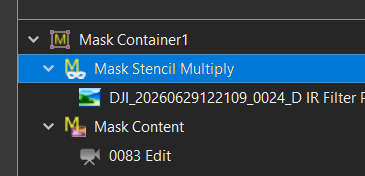
Thanks Igor I got that part and added the content 'Mask Stencil" and "Mask Content" but if you want to change the "Mask Container" type after you have already selected an option. I right clicked but no option to change from Multiply to Overlay that I could see or am I missing it? ,In the image attached I added "Multiply" to the Name Box.
-
Thanks, Igor for including this. I started experimenting with this yesterday, and it is very interesting. Using both with a still image and a video. Working out how the Stencil and the Content interact is difficult, even though I use Masks in PS. Is there a way of changing the mask Blend Mode after the initial option is selected, or do you need to create a new Mask for each new Blend Mode?the selected Alternately, maybe the selected "Mask Container" or the "Mask Stencil" name box could show the Blending Style option rather than the generic name for future reference if that is possible at this late notice. If not, I am thinking of creating a template for each Blending Mode and trying the different modes with an image to get used to the effect. Thanks Mark
-
Thank you - glad you enjoyed it.
-
Thanks Jim, I have shared this with the group both as individual images and well as the AV. The camera group I started 16 years ago has photographed over 75 productions for this theatre group. For this one we had about 15 members present and 20 - 30 images from each member, so the cast and crew get around 400 images for their use. Mark
-
Fixed - when it first loaded it showed the video. Was waiting for the property owner to come back to me so now public.
-
A project for a client last weekend.
-
Inspired by the transitions posted by jienense to make this AV overnight of a local theatre company production.
