

goddi
-
Posts
3,596 -
Joined
-
Last visited
-
Days Won
27
Everything posted by goddi
-
Greetings... Just excellent!!! Gary
-
Igor, Does this update also correct the max upload size of files to the Slideshowclub? Gary
-
Greetings Judy... I am also trying to get deeper into editing video. You might have noticed in the site that you linked, it has a link to the DaVinci Resolve video editing program. If you go to that link, https://www.blackmagicdesign.com/uk/products/davinciresolve/ and go to the very bottom of that page, you will see a download for a free version of DaVinci Resolve 12.5.6. I had downloaded it a while ago but have not had time to get into it. Seems to have a lot of potential. I will be looking into Lightroom too. Many tools, so little time. Gary
-
Greetings, I think this has been addressed and fixed, to a point, but I think it is still not completely fixed. When I convert a 1920x1080 clip, the Resize dropdown list provides 1920x1080, 1280x720, 1024x576 and 960x760. Ok, no problem. However, when I try to convert a 2704x1520 clip (from GoPro), the only Resize choices I get are 2704x1520 and 1352x760. Shouldn't we get all the Resize figures when I have a 2704x1520 clip? I can type in, for example, 1920x1080, and it accepts it. But it would be better to have all the sizes listed. Gary
-
Dave... Why would you say that? You have made some points but have not addressed my question as to why the Transition time needs to be changed when a Style is applied. You state what PTE does but not why it needs to be that way. Ok...never mind. Gary
-
Another example of why I think the Style should not affect the already set Transition time: I applied a Style to a video clip that had a Transition time of 1.5. After applying the Style, the Transition time changed to 5.365. Makes no sense. I have to manually reset the Transition time for the clip to 1.5. Gary
-
Dave, I really see no need for the 'Speed' indication, especially when you have no animation in the Style. I have no animation in the Style I am using. I think your indication to 'ignore' the Speed is not intuitive unless you are told it does not mean anything. I don't see its usefulness even if you have animation in your Style. Just my opinion. Setting the Duration seems to be the only real criteria needed when a Style is applied, especially when you are applying it to video clips that would naturally be different than an overall Project setting made for images. Also, you can't change the Speed independently from the Full Duration in the Style. Changes in Speed is only a result of the changes in the Full Duration, which is what you really want to affect. If you want to change the Speed of an animation, I'd think you would do it in O&A. Ok, back to my main point about the change in the Transition time after a Style is applied. I don't see why the Transition time needs to be changed after a Style has been applied. If I have set the Transition time for a slide to be 1.5, why would it needs to be changed just because I have applied a Style, whether or not it has an animation in it? My Style that I am using does not have any animation (or even it it did), so there should not be any affect on the previously set Transition of the slide. I know you said "...when applying the Style it affects both the Duration and the Transition Time...". I don't think it should affect the already set Transition Time. I think the 'doctor' I need is Igor to make sense of this.... Gary
-
To add to my confusion, I have 2 Styles that do the same thing, Border, 95% size and aspect crop. In the Slide Style selection screen, one shows a Full Duration of 5.0; the other shows a Full Duration of 6.5. It seems that if I edit the '5.0' Style's Full Duration to 6.5, I should get the same results as applying the '6.5' Style. But The '5.0' Style give the different results mentioned above. Not sure why this would happen. Any ideas? Gary
-
If there is no animation in the Style that was created, why would changing the 'Full Duration' time in the Style change the Speed? 'Speed %' of what? When a Style is applied to an exiting slide, any animation is dumped, anyway. The Duration is the duration of what it is set at. So I don't understand what this is referring to. Gary
-
Ok...let's not deal with the Speed question for now. The other changes to Duration and Transition times occur when the Slide Style is applied to a slide that has no animation. Why would I get the unexpected changes in the Duration and Transition times? Why would it not retain the previously set Duration and Transition times? Gary
-
Greetings, I have a question where the application of a Slide Style changes the 'Duration' and 'Transition' times of a slide. Here is what I have done: My 'Project Options/Transition' time is set for 1.5 and Default Duration is set to 5.0. I have a slide in the Slides View that shows 'Duration' of 5.0 and 'Transition' of 1.5. I want to apply a Slide Style that I had made that sets a border, size of 95% and aspect crop. When the Slide Style opens, it shows 'Full Duration' of 5.00 and 'Speed' of 100. So I change the 'Full Duration' of the Slide Style to 6.5 to match the 5.0 Duration plus the 1.5 Transition that have for the slide. First question. When I do this, the 'Speed' changes from 100 to 77. What does this mean? Why is it even important? Next. After I apply the Slide Style, the slide in the Slides View shows Duration of 4.999 (instead of 5.0) and Transition of 1.95 (instead of 1.5). Second question: Why does it not keep my Duration of 5.0 and Transition of 1.5? I have to manually change these setting for each slide that I apply this Slide Style to. Thanks... Gary
-
Greeting Denis... How do you determine what the fps are of an exe??? Gary
-
Greetings, This project is a very short show that I made from some GoPro video clips using their Quik video editing program. The Quik program is very limiting and basic but kind of fun to play with. But you need PTE to add beginning/ending frames and text. Have a taste of my Salmon Soup. (I published it at 60fps.) https://www.slideshowclub.com/files/file/490-salmon-soup-helsinki/ Gary
-
Greetings Jose, I will take more care in choosing the FPS when I create my MP4s. It should make a difference, as you stated, to increase the FPS based on the embedded videos' FPS. I took a look at the 'HandySaw DS' program's info. Seems interesting but have not tried it yet. I have the Mercalli program but have not used it for a long time. I should get back to trying it out but it was a bit confusing when I first tried it. But stabilization is very important. Thanks for the info. Gary ADDED LATER: But I just notice that when you Publish for a MAC, you have not input to select the FPS. How come????
-
Greetings, I normally Publish a project as HD Video using 30fps. However, I recently Published a project at 60fps. I 'think' I see a difference. This project is all video clips. In one of the clips, the movement of people walking does seem to be smoother. But I am not sure if it is just my ‘wanting’ it to be smoother or I am really detecting it. I tried it on another project that has some video clips and I did not detect any smoother motion in the clip when I compared the project Published as 30fps vs. 60fps. I understand that I ‘should’ see a difference because there are more frames to smooth the motion. The penalty is, of course, a larger file. My question is, should I always, to be safe, just output all MP4s using 60fps if there are any videos or any animation of stills? If the animation of stills is only with slight panning or zooming, should there be any improvement in smoothness? Would 60fps even affect a project that is only still images with no animation? When a project is Published as an exe, I am assuming there is no way of affecting the fps? Is there a ‘rule’ when to use 30fps vs 60fps? Gary
-
Greetings, I would like to be able to add a Style to an image while in O&A. I say this because, sometimes, I decide that I want to add a Style to an image(s) after I have already created some animation for an image. Since Styles are not 'additive', adding a Style will remove any animation that had been created. It would be nice to be able to see what the animation was just before adding the Style, while in O&A. Sometimes, by accident, a Style can be added to an already animated image and you might not realize it when you do it from the Slides view. Sure, you can't do Styles that require multiple images, but it would help with other type singular-image Styles. Gary
-
Maureen, We've been to many places in S. America but not yet to Guatemala. But I always like to see shows of trips around the world. From our recent trip to Italy (driving from Naples to Palermo), I had lots of images and videos to create a bunch of shows. But the max size of uploads to the Slideshowclub has been reduced so I can't upload a few in the series. Igor knows about the problem but has not been able to fix it. My video clips seem to push the file sizes. Gary
-
Greetings... I like the more time given to the images. Very nice and interesting. Gary
-
Greetings Maureen, Needless to say, great images. It's the kind of trip I'd like to make. But I have a question concerning the 'production' of the show. It looks like the durations of the images are the same as the durations of the fade transition. I'd like to see more of the image and less of the fade transition's duration. During the transitions, they seem like about 3 seconds, my eyes get tired getting through that long fade. It is relatively so long, it sort of hurts my eyes. Then I only see the image for about 3 seconds. Maybe it is just me, but long fade transitions make want to hit the right-mouse button just to get to the next image. I have seen the long transitions done in other people's shows and it just is difficult on my eyes. Just my two-cents. Great images but the long transitions are hard on my eyes. I'd reduce the transition duration and add it to the images' duration. Gary
-
Greetings, The latest version at the PTE site is 9.0.10. During one discussion with Igor (I can't find where exactly it was), he had me download 9.0.11 to fix a problem. So, what is the latest version? If I have 9.0.11, should I dump it and go back to 9.0.10 or is there really a 9.0.11 out there??? Gary Later: I found where I got the 9.0.11
-
Igor, Yes, I did not think of the 256 vs 128 kbps. Thanks... Gary
-
Greetings All, I had not used this feature in the past. So I just tried it on a couple shows. In the first test, I had only a couple slides with an audio track that lasted much longer than the actual slides. So the result was that the 'converted' show was about half the size of the 'non-converted' show. Ok. But then I tried it on a much larger show where the many audio files ended with the end of the images in the show. The unexpected result was that the 'converted' show is actually larger than the 'non-converted' show. Is there any explanation why this would happen? Gary

-
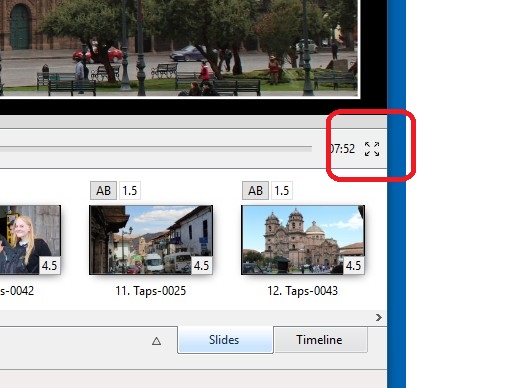
Sure...just go to the four-arrow icon in the lower right hand corner. Gary
-
Igor, I am using 9.0.11, and have not seen any error messages. However, there still is an annoying thing happening. When you have highlight an image (slide) in the Slides, and then switch from the Slides to the Timeline, the image does not move or re-position. This is good. The image (slide) stays in the relative same position. However, when you switch back to Slides, the image (slide) gets moved to the far right of the screen (does not stay in the same relative position). It would be nice to keep the highlighted image (slide) in the same relative position as you switch back and forth between the Slides and Timeline views. Gary
-
Phil, I copied a bunch of MP4 PTE shows to a DVD as data and tried to play them on my JVC BD player. They don't play. Am I missing something? I looked at the documentation and 'MP4' was not even mentioned as being a format it plays. Maybe my JVC BD player is too old? Can, in fact, DVD players play MP4's? Gary