

jt49
-
Posts
1,459 -
Joined
-
Last visited
-
Days Won
16
Everything posted by jt49
-
Denis' method for the change of focal length really works well, and it is easier to handle than the method I mentioned above. Both methods are more or less equivalent, but when programming a dolly zoom, Denis' method gives a better result.
-
???
-
For the butterfly you may use my model to render it at a (very) long focal length (160mm or even more). I would guess that your distortion problem will become less pronounced. On the other hand, we are in 3D, and the distortion is a quite natural effect, isn't it?
-
PTE renders everything with the fixed center of projection at the point with the coordinates X=Y=0, Z=-346.4 (sqrt(3) x height of the screen). It gives us the perspective of a lens with a focal length of about 40mm. It isn't that difficult to emulate a change of this focal length as you can see from the attached example whose construction I learned from Jean-Cyprien. SimpleFocalLenthChange.zip
-
It seems that the same happens with the Slide Options Window. It also happens when you make some change and undo it, either in O&A or in the Main Window. So, the Undo Button shows that there has not been any change, but when closing the project you see window shown in davegee's message.
-
I have made a few tests; the problem seems to be solved
-
PTE 11.0.9 has a problem with custom transitions and some built in transitions when copying slides from one project to another one. While playing around with this problem, my Cube 3D transition got corrupted. So I deleted the global storage for transitions (folder containing effectuser.ini) and built it up anew. Of course I had to re-import all my custom transitions. It would be fine if it were possible to import several transitions at the same time, and not one by one.
-
I have various problems problems with transitions. - If I copy a slide with a custom transition from one project to another one (via the windows clipboard), the copied slide shows a simple dissolve (my standard transition) while in the slide options the original custom transition is indicated. - Maybe a related problem: On my system (Windows 10, PTE 11.0.9) the attached project shows a simple dissolve for slide 3, but in the slide options for slide 3, I see "Cube 3D". Remark: I deleted the attached project as it may cause problems on other users PTE transition store.
-
The suggested synchronization isn't possible. In the project options we have global settings while in the timeline there are local values, and there can be different values at different audio key points. I would like to agree that it would be helpful to have manual input for audio key points.
-
I know the shadow function quite well. If you like shadows then it is OK. But if you would like to see a stroke with a sharp border the PTE shadows obviously do not work. So I would like to suggest a stroke function for text objects (similar to the one in Photoshop, see my example from above).
-
We should clarify what outlined text should mean This is what I am thinking of:

-
???
-
PTE automatically uses for audio output the device that Windows marks as "Standard" (or "Default"). So within PTE you cannot do anything. A solution for a future version of PTE: Allow the user to choose the output device for PTE, as we can do it in the audio player "foobar2000":
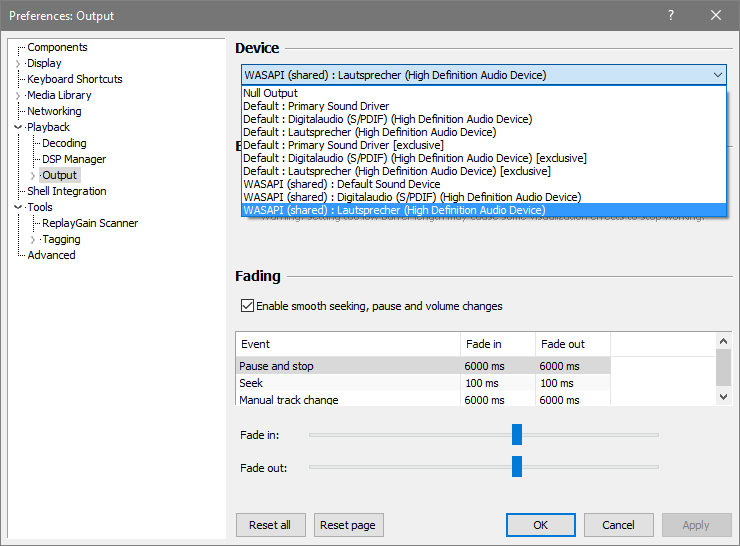
-
In this context, I would regard the notion "Save" as a bit misunderstanding for typical users. I think that Igor's concept is OK; maybe the location in "Tools" isn't that advantageous.
-
I have no doubt that this is true. Many users consider this function essential to avoid data loss, but obviously it isn't.
-
Thanks, I have never noticed this function which is a bit hidden. It is nice to have it.
-
I'm not sure about what SoCu really means. I see a kind of problem with O&A: You open it for some slide, and make 10 modifications. Then you come to the decision to leave the slide as had been before opening O&A (i.e. leaving the slide unchanged). In this situation you cannot close O&A with just one click. You have to click the undo button 10 times. My opinion on "Autosave every x minutes": A horrible feature. You sometimes make a mistake and some nice work is gone. If then Autosave does what it is meant to do, then you have lost something. I myself prefer my own version management which gives me the opportunity to backtrack the whole development of my project. But: chacun à son goût
-
 That's true. IMO, PTE should offer additional functions to change the paths to the images of a given project, see also here.
 -
This would cause a lot of trouble, in particular with projects where the images are spread over several folders.
-
The folder does not recognize anything. It is an old feature of PTE: If it cannot find a particular image when opening a project file, it checks if it can find the lost image in the folder containing the project file. That's all.
-
Create a copy of your original project folder (including images and a PTE-file). Rename your original folder (for a few minutes). Open the PTE-file in the new folder. Now PTE will not find the original images (because of renaming the original folder). But PTE will find the copies of the images in the new folder. Go to the file menu and save the project file (in the new folder), which should change the paths to the images in the new folder. Rename your original folder to its original name.
-
For AVI videos PTE uses MPEG4 - Advanced Simple Profile.
-
The disadvantage of this method is, that later on it will be difficult to add changes to the soundtrack. IMO Gary's suggestion is the way to go
-
"Photo-fold" does not exist. We only have "Photo Flip". In the French UI "Photo Flip" is called "Photo-pliage" Deepl and Google Translator translate "Photo-pliage" to "Photo-folding" I use Version 11.0.8, and Photo Flip works (for me)
-
For many built-in styles we have parameters (options). I would like have parameters for user styles, as well; if I could choose animation parameters (for main images, and non-main images) at particular keyframes to work as style parameters. Presently I use a workaround with a text editor on project files.


